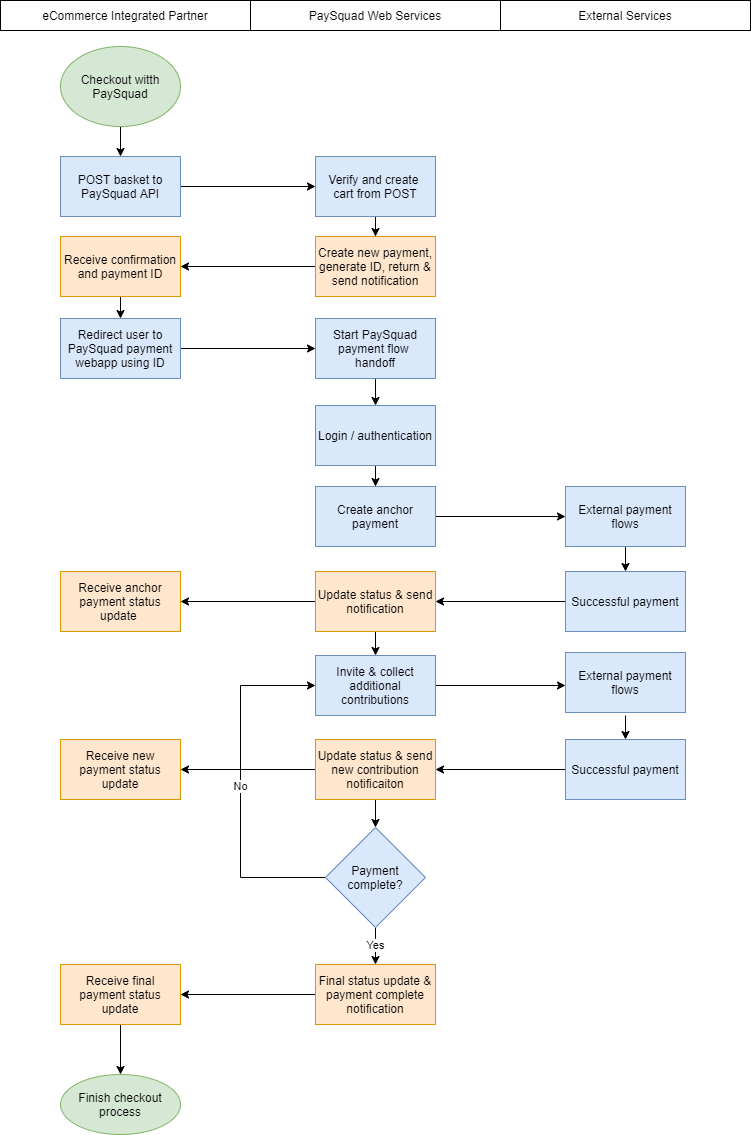
A typical Paysquad lifecycle looks like this:
- Shopper reaches checkout on your site. They choose Paysquad as the payment method.
- Your server calls
POST /api/merchant/paysquadwith the basket, total, currency, and optional redirect and webhook URLs. We return201 Createdwith apaySquadIdandcontributionLink. - You redirect the Shopper to
contributionLink. They become the Squad Leader. - Paysquad hosted flow takes over. The Squad Leader signs in, makes their first contribution, and invites others.
- Contributors contribute via the same link. Each contribution is authorised as it's made; nothing is charged yet.
- The Paysquad reaches its total. Paysquad captures all contributions. Status becomes
Complete. - Paysquad sends a
paysquad.succeededwebhook. Your server receives it, verifies the signature, and fulfils the order. - Settlement. Paysquad settles the Merchant net of fees on our standard payout schedule.
Failure paths
| Scenario | Status | Reason | Webhook |
|---|---|---|---|
| No contributions by expiry | Failed | Abandoned | paysquad.failed |
| Contributions made but total not met by expiry | Failed | Expired | paysquad.failed |
| Squad Leader cancels inside the hosted flow | Failed | Cancellation | paysquad.cancelled |
| Merchant cancels from the Merchant Portal | Failed | Cancellation | paysquad.cancelled |
Refunds
A Paysquad in Complete status can be refunded once, for the full amount, by calling POST /api/merchant/paysquad/refund. Partial refunds are not currently supported. Refund requests are queued; you will be notified by email when funds are returned. Status becomes Refunded.
Flow Diagram